Name
admin-config - NaviServer Configuration Guide
Table Of Contents
- Table Of Contents
- Description
- Configuration Files
- Server Network Configuration
- Single Server, single address, single port
- Multiple alternative server configurations in one configuration file
- Single server listening on multiple IP addresses
- Single server listening on multiple ports
- Single server registering multiple drivers
- Virtual servers
- Virtual servers with HTTPS
- Virtual servers with HTTPS and SNI
- Single virtual server with mass virtual hosting (HTTP)
- Single virtual server with mass virtual hosting using HTTPS and SNI
- Redirecting from HTTP to HTTPS
- Customizing System Generated HTTP Responses
- TLS and Certificate Handling
- Outgoing HTTPS Requests (ns_http, ns_connchan)
- Proxy and Gateway Configuration
- Customizing Directory Structure
- Global and Per-Server Logfiles
- Stack Size
- See Also
- Keywords
Description
When NaviServer is started, a configuration is provided that defines how the server instance is initialized and run. The configuration is written in Tcl and specifies, among other things, network listeners, logging, database drivers, module loading, and server-specific parameters.
A configuration may be supplied as a single Tcl file or as a directory containing multiple configuration fragments, which are evaluated in lexical order. In both cases, the resulting configuration can define one or more server instances, which may run concurrently or be selected via command line arguments (see admin-maintenance).
For a reference of available configuration sections and parameters, see admin-config-params.html.
Configuration Files
The NaviServer configuration file consists of multiple sections (defined via the ns_section command) containing global configuration of the instance as well as sections for each server and module. The configuration file is actually a Tcl script, such that a user can set variables, define procs to avoid repeated patterns, and apply other Tcl mechanisms as needed. Tcl variables are typically used to define parameters at the beginning of the file that are changed frequently, which eases maintenance.
The following sample configurations may be used as starting points for site-specific setups. The main NaviServer and OpenACS configurations are available both as a single Tcl file and as a directory containing ordered configuration fragments. The single-file variants are generated from the corresponding configuration directories.
Simple single-file configuration: simple-config.tcl
NaviServer base configuration: NaviServer base configuration:
single file: nsd-config.tcl
directory: conf/nsd-config.d/
OpenACS configuration:
single file: openacs-config.tcl
directory: conf/openacs-config.d/
For new installations or more complex setups, using the directory-based configuration is recommended, as it allows modular customization and reuse of configuration fragments.
Several configuration hints and details can also be found in other places in the manual, such as e.g. in admin-tuning or in the documentation of module-specific parameters (since not every module is required in every installation). Furthermore, the configuration mechanism of NaviServer is extensible; therefore, modules and applications can also use the configuration file and its abstractions to define application-specific parameters. As a consequence, a complete listing of all possible parameters can never be provided. On this page, we primarily define introductory examples for typical usage scenarios.
Configuration directories
NaviServer accepts configuration either from a single Tcl file or from a directory containing multiple Tcl fragments.
When the argument to -t names a directory, NaviServer loads all files matching *.tcl from that directory in lexicographic order. This allows large configurations to be split into maintainable fragments while remaining backward compatible with single-file configurations.
Example:
/usr/local/ns/bin/nsd -t conf/nsd-config.d -T
A configuration directory is typically organized into numbered fragments such as 00-bootstrap.tcl, 10-parameters.tcl, ..., 70-final.tcl. The numbering is a convention; the only strict requirement is that fragments defining shared variables must run before fragments that use them.
Since fragments are loaded in order, concatenating them yields the same behavior as a single configuration file.
Directory mode is supported for normal startup and for -T test mode.
Only *.tcl files are considered; other files are ignored.
Fragments are loaded in lexicographic order using the file names.
Using ns_configure_variables for defaults and overrides
The sample configuration files shipped with NaviServer use a helper procedure named ns_configure_variables to manage configuration variables.
The procedure takes a dictionary of default values and a prefix for environment variables. For each dictionary key, a Tcl variable of the same name is established in the configuration scope. Values can reference other variables and are processed using Tcl substitution, allowing patterns such as $home/logs.
The precedence rules are:
Values already set in the configuration script.
Environment variables with the specified prefix (e.g. oacs_httpport).
Default values from the dictionary.
This mechanism is especially useful for containerized deployments because it allows enabling features and overriding values without editing configuration files, simply by setting environment variables.
Some configurations support an optional setupfile key in the defaults dictionary. When present and non-empty, this file is sourced after applying the default and environment-based values and can be used for instance-specific variable assignments.
Bulk population of configuration sections
In addition to listing parameters one by one with ns_param, a section can be populated from an existing ns_set or from another configuration section. This is useful for sharing common parameter blocks (e.g., shared defaults between HTTP and HTTPS drivers) while keeping the configuration readable.
The -set option injects the key/value pairs from the provided ns_set into the target section as if they were specified via individual ns_param calls. Since ns_set is a multi-map, duplicate keys are preserved unless the section is defined with -update.
The -from option injects the key/value pairs from an already-defined configuration section into the target section. When both -from and -set are specified, the content from -from is applied first, followed by the content from -set. The section body is evaluated last.
 #
 # Shared driver defaults (template section)
 #
 ns_section ns/driver/common {
   ns_param defaultserver default
   ns_param address       $ipaddress
   ns_param hostname      [lindex $hostname 0]
 }
 #
 # HTTP driver uses the shared defaults and overrides port
 #
 ns_section -update -from ns/driver/common ns/module/http {
     ns_param port $httpport
 }

 #
 # HTTPS driver uses the shared defaults and overrides port
 #
 ns_section -update -from ns/driver/common ns/module/https {
     ns_param port $httpsport
 }
For programmatically generated parameter blocks (e.g., derived from loops), -set can be used with an ns_set.
Configuration structure
NaviServer configuration files (either single files or configuration directories) are typically organized into a small number of logical sections. The following structure is used by the sample configurations shipped with NaviServer and is recommended for larger installations.
Bootstrap and defaults
Tcl setup and environment checks
Definition of default configuration values
Application of overrides (e.g. via environment variables)
This section usually appears first and establishes variables that are used throughout the remainder of the configuration.
Global configuration
general parameters (sections under ns/parameters)
thread configuration (sections under ns/threads)
MIME types (sections under ns/mimetypes)
global runtime settings (e.g. ns/fastpath)
database drivers and pools (sections under ns/db)
global modules (sections under ns/modules)
server registry (section ns/servers)
These sections apply to all servers defined in the configuration.
Server-specific configuration
server parameters (sections under ns/server/$server)
per-server modules (sections under ns/server/$server/modules)
per-server module parameters (sections under ns/server/$server/module/...)
Here, $server denotes the name of the server configuration. It may be provided via a Tcl variable or replaced by a literal name when multiple servers are configured.
Final diagnostics and optional extras
diagnostic logging
optional helper commands
sample or commented configuration blocks
These sections typically appear last and do not define core runtime behavior.
When a configuration directory is used, each of these logical sections is usually placed into one or more numbered fragment files (for example, 00-bootstrap.tcl, 10-parameters.tcl, …, 70-final.tcl). Fragments are loaded in lexicographic order and evaluated in a single interpreter, so variables defined in earlier fragments are available to later ones.
Server Network Configuration
In general, when modifying configuration files, it is always a good idea to check whether a configuration file is syntactically correct before starting the server. This can reduce the downtime of a production server in case of typos. A configuration file named nsd-config.tcl can be checked with the command line option -T of NaviServer.
/usr/local/ns/bin/nsd -t nsd-config.tcl -T
The global parameters contain the basic setup information, where for example the root of the root of nsd is, where the server log is to be written.
 ns_section ns/parameters {
   ns_param home             /var/www/myserver/
   ns_param tcllibrary       tcl
   ns_param systemlog        nsd.log
   # ...
 }
Below, we address some general design considerations when tailoring your one configuration files. Check for simple or real-live setups of larger installations by the provided sample configuration files.
One of the core components of the configuration file are the network drivers: what protocols should be used, on which addresses/ports should be used, or how to set up virtual servers. The most important network drivers of NaviServer are nssock (for HTTP connections) and nsssl (for HTTPS connections).
Several additional network drivers are available via extra modules, such as e.g. nsudp, nssmtpd (for a full list of modules, see the module repository).
Single Server, single address, single port
In the simplest case, one defines in a configuration file a single server s1 with a single network driver nssock used for plain HTTP connections. In the example below, the server is listening on port 8000.
 ns_section ns/servers {
   ns_param s1 "Server Instance 1"
 }

 ns_section ns/server/s1/modules {
   ns_param http nssock.so
 }

 ns_section ns/server/s1/module/http {
   ns_param address 0.0.0.0
   ns_param port    8000
 }
In this example, the module nssock is loaded for the server "s1" under the name "http". We show, in later examples, how to load a network driver globally, such that one network driver can be used for multiple servers.
Multiple alternative server configurations in one configuration file
It is as well possible to define multiple server configurations in the same configuration file (here s1 and s2). IN the following example these servers use the same driver nsock but with different ports. In this case, it is sufficient to load the driver once.
 ns_section ns/servers {
   ns_param s1     "Server Instance 1"
   ns_param s2     "Server Instance 1"
 }

 #
 # Server s1
 #
 ns_section ns/server/s1/modules {
   ns_param http nssock.so
 }

 ns_section ns/server/s1/module/http {
   ns_param address  0.0.0.0
   ns_param port     8000
 }

 #
 # Server s2
 #
 ns_section ns/server/s2/modules {
   ns_param http  nssock.so
 }

 ns_section ns/server/s2/module/http {
   ns_param address  0.0.0.0
   ns_param port     8001
 }
When the configuration file above is named e.g., two-server-config.tcl, the two servers can be started with a command line like:
/usr/local/ns/bin/nsd -u nsadmin -t two-server-config.tcl -f
When it is the goal to start only one of these servers, one can use e.g. the following command:
/usr/local/ns/bin/nsd -u nsadmin -t two-server-config.tcl -f -server s2
Single server listening on multiple IP addresses
Often, a server has the requirement to listen on multiple addresses, such as on one (or many) IPv4 and one (or many) IPv6 addresses. This can be addressed by simply providing the list of values as a parameter value.
 ns_section ns/servers {
   ns_param s1 "Server Instance 1"
 }

 ns_section ns/server/s1/modules {
   ns_param http nssock.so
 }

 ns_section ns/server/s1/module/http {
   ns_param address "137.208.116.31 2001:628:404:74::31"
   ns_param port    8000
 }
Single server listening on multiple ports
Similarly, we can define a single server, listening on multiple ports. In this case, one can load multiple instances of the driver, where each of the driver listens on a different port.
 #
 # Server s1, using listening on two ports
 #
 ns_section ns/server/s1/modules {
   ns_param http nssock.so
 }

 ns_section ns/server/s1/module/http {
   ns_param address   0.0.0.0
   ns_param port      "8000 8001"
 }
When multiple IP addresses and multiple ports are specified, the server will be listening for every specified address on every specified port. In the following example, it will listen on four different combinations of addresses and ports.
 ns_section ns/server/s1/module/http {
   ns_param address "137.208.116.31 2001:628:404:74::31"
   ns_param port    "8000 8001"
 }
Single server registering multiple drivers
In the last two examples, a single server is listening on different ports and or IP addresses, but the configuration of the driver was otherwise identical. In case, different driver parameters are needed, it is possible to load the same driver multiple times for the same server with different driver names. In the following example, we name the different instances of the network driver http1 and http1.
 #
 # Server s1, using two drivers for listening on two ports on two
 # different addresses.
 #
 ns_section ns/server/s1/modules {
   ns_param http1  nssock.so
   ns_param http2  nssock.so
 }

 ns_section ns/server/s1/module/http1 {
   ns_param address   0.0.0.0
   ns_param port      8000
 }

 ns_section ns/server/s1/module/http2 {
   ns_param address   127.0.0.1
   ns_param port      8001
 }
It would be as well possible to register multiple addresses for every network driver instance (here "http1" and "http2"). In general, by loading a network driver multiple times, all the of parameters of the driver modules (here nssock) can be modified per driver instance.
Virtual servers
Virtual servers allow you to host multiple, distinct server configurations on the same IP address and port. Unlike defining alternative server configurations that are activated one at a time (what we have done above), virtual servers coexist concurrently. When a request arrives, NaviServer examines the HTTP/1.1 Host: header to select the matching virtual server configuration.
A common use case is serving the same content under several DNS names (e.g. foo.com and www.foo.com) using the same server configuration. To enable this, list each hostname under the ns/module/http/servers section, mapping names to a single server instance.
 ns_section ns/servers {
   ns_param s1  "Virtual Instance 1"
 }

 ns_section ns/modules {
   ns_param http nssock.so
 }

 ns_section ns/module/http {
   ns_param address  0.0.0.0
   ns_param port     8000
 }

 #
 # Map DNS names to the s1 server configuration
 #
 ns_section ns/module/http/servers {
   #
   # Domain names for s1
   #
   ns_param s1 foo.com
   ns_param s1 www.foo.com
 }
In the example above, a single server instance "s1" responds to both foo.com and www.foo.com. You can also define multiple server configurations, each with its own thread pool, document root, loaded modules, and network driver by adding additional entries in ns/servers and corresponding ns/module/http/servers mappings. By doing so, you can define that a certain set of DNS names are routed to one server and some to another server (see Figure 1).
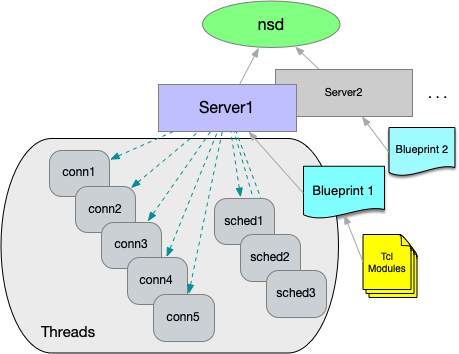
Figure 1: NaviServer Blueprint (per server)
When NaviServer is started, it reads first the configuration file, which contains the definition of all servers, and then, it creates and configures the virtual servers based on this information. This is also the reason, why certain (server-specific) commands cannot be contained (and executed) in the configuration file (e.g., registering URL handlers, callbacks, etc.), but can be loaded from the module files (see also tcl-libraries.html). Additionally, it is possible to specify server specific commands in the section ns/server/SERVERNAME/tcl with the parameter initcmds (see also tcl-libraries.html).
Note that it is also possible to define virtual servers with a single NaviServer server definition, but this will be covered later.
In the following example, we define two separate servers "s1" and "s2", which should act as virtual web servers. This means, we want to define one network driver, which listens on a single port, but which should direct requests to one of the two potentially differently configured servers based on the content of the host header field.
Assume for the IP address of the server the DNS names foo.com, bar.com and baz.com are registered. We define server "s1" and "s2" such that "s1" should receive requests from foo.com, and "s2" should receive requests from bar.com and baz.com. Servers "s1" and "s2" have different pagedir definitions.
For defining virtual servers, the network driver has to be loaded globally (i.e., as module ns/module/http). For requests with missing/invalid host header fields, we have to define a defaultserver to handle such requests in the global definition. In the section ns/module/http/servers we define the mapping between the hostnames and the defined servers.
 #
 # Define two servers s1 and s2 as virtual servers
 #
 ns_section ns/servers {
   ns_param s1  "Virtual Server s1"
   ns_param s2  "Virtual Server s2 "
 }
 ns_section ns/server/s1/fastpath {
   ns_param pagedir /var/www/s1
 }
 ns_section ns/server/s2/fastpath {
   ns_param pagedir /var/www/s2
 }

 #
 # Define a global nssock driver named "http",
 # directing requests to the virtual servers
 # based on the "Host:" header field.
 #
 # It is necessary to define a "defaultserver"
 # for requests without a "Host:" header field.
 #
 ns_section ns/modules {
   ns_param http nssock.so
 }
 ns_section ns/module/http {
   ns_param port          8000
   ns_param defaultserver s1
 }

 #
 # Define the mapping between the DNS names and the servers.
 #
 ns_section ns/module/http/servers {
   #
   # Domain names for s1
   #
   ns_param s1 foo.com
   #
   # Domain names for s2
   #
   ns_param s2 bar.com
   ns_param s2 baz.com
 }
Note that one can define multiple DNS names also for a single server. With the definition above, "s1" serves foo.com and "s2" serves bar.com and baz.com. Since "s1" is the default server, requests with unregistered hostnames will also be directed to it.
Virtual servers with HTTPS
In general, the logic of the definition of servers and network drivers is the same for HTTP (driver nssock) and HTTPS (driver nsssl), except that the latter has some additional configuration parameters, such as e.g. the certificate, the private key, or a special configuration of the ciphers, etc.
In order to define virtual servers with HTTPS, one can essentially use the definition of the previous section, and load as well the nsssl driver globally with the name "https", and configure it accordingly.
 #
 # Define a global nsssl driver named https
 #
 ns_section ns/modules {
   ns_param https nsssl.so
 }

 ns_section ns/module/https {
   ns_param port          8433
   ns_param defaultserver s1
   ns_param certificate   /usr/local/ns/modules/https/server.pem  ;# required, PEM format
   ns_param key           /usr/local/ns/modules/https/server.key  ;# optional, PEM format
 }

 ns_section ns/module/https/servers {
   ns_param s1 foo.com
   ns_param s2 bar.com
   ns_param s2 baz.com
 }
The parameter certificate specifies the certificate chain. Optionally, a separate private key can be provided via key. When key is not specified (or an empty string), the private key is expected to be included in the certificate file. However, this case requires that all accepted hostnames are listed in the certificate. Such certificates are called multi-domain SAN certificates.
However, there might be cases, where a server listening on a single address has to provide different certificates for e.g. "foo.com" and "bar.com". For virtual hosting, this is a chicken-egg problem: the right certificate is needed at the time the connection is opened, but the virtual server can be only detected while reading the request header.
This is a well-known problem, for which the SNI TLS extension was invented (a hostname that can be used for identifying the certificate is passed during the TLS handshake as well).
Virtual servers with HTTPS and SNI
In order to configure SNI (Server Name Indication) for HTTPS, additional certificates can be configured for the virtual servers. Optionally, separate private key files can be specified via parameter key.
In the following example the default certificate is defined on the level of the global driver (server.pem), whereas the certificate for the server "foo.com" (which will be served by "s1") is defined for the server "s1" separately (foo.com.pem).
 #
 # Define a global nsssl driver named "https"
 #
 ns_section ns/modules {
   ns_param https nsssl.so
 }
 ns_section ns/module/https {
   ns_param port          8433
   ns_param defaultserver s1
   ns_param certificate   /usr/local/ns/modules/https/server.pem  ;# required, PEM format
   ns_param key           /usr/local/ns/modules/https/server.key  ;# optional, PEM format
 }
 ns_section ns/module/https/servers {
   ns_param s1 foo.com
   ns_param s2 bar.com
   ns_param s2 baz.com
 }

 #
 # Define a server-specific certificate to enable SNI.
 #
 ns_section ns/server/s1/module/https {
   ns_param certificate       /usr/local/ns/modules/https/foo.com.pem  ;# required, PEM format
   ns_param key               /usr/local/ns/modules/https/foo.com.key  ;# optional, PEM format
 }
Single virtual server with mass virtual hosting (HTTP)
The virtual servers defined in the last sections have the disadvantage that these require to know the server upfront, to include the server definition in the configuration file. Therefore, adding another virtual server requires a restart which is quick, but still, will interrupt services. In case, the virtual hosts are very similar, it is possible to define a single virtual server hosting multiple domains, serving e.g. from different page directories.
The following example defines server "s1" serving only for HTTP connections over port 8000. The new part is the registration of a callback via ns_serverrootproc, which determines the root directory for serving pages based on the "host:" header field. The definition assumes a directory structure like the following, where "foo.com" has, e.g., a different index.html file.
 /var/www/
 ├── default
 │   └── index.html
 ├── foo.com
 │   └── index.html
 ...
When the content of the host header field is found in the filesystem under /var/www, it is used as the pageroot for this request.
 #
 # Define server "s1"
 #  - listening on all IP addresses,
 #  - port 8000,
 #  - serve pages from /var/www/
 #
 ns_section ns/servers {
   ns_param s1        "Sample Server"
 }
 ns_section ns/server/s1 {
   ns_param serverdir /var/www
   ns_param serverrootproc {
     #
     # Register callback for computing the per-request "serverdir":
     #
     set rootDir [ns_server serverdir]
     set host [ns_conn host ""]
     if {$host ne "" && [file isdirectory $rootDir/$host ]} {
       #
       # A "host" header field was provided in the request, and a matching
       # folder exists in the filesystem -> use it as "serverdir"
       #
       set serverDir $rootDir/$host
     } else {
       set serverDir $rootDir/[ns_info server]
       ns_log notice "... $rootDir/$host does not exist, use default '$serverDir'"
     }
     return $serverDir
   }
 }
 ns_section ns/server/s1/modules {
   ns_param http      nssock.so
 }
 ns_section ns/server/s1/module/http {
   ns_param address   0.0.0.0
   ns_param port      8000
 }
 ns_section ns/server/s1/fastpath {
   ns_param pagedir   ""
 }
With this approach additional domains can be added at runtime of NaviServer by adding new directories for them.
Single virtual server with mass virtual hosting using HTTPS and SNI
While the previous section works for mass virtual hosting with plain HTTP, the usage of HTTPS requires certificates, where multi-domain SAN certificates can't be used, since mass hosting is supposed to work without server restart. One cannot anticipate the domain names, which are added.
Starting with NaviServer 5, it is possible to specify a directory containing individual certificates for virtual hosts with the parameter vhostcertificates in the nsssl module definition. When NaviServer receives a request with an SNI hostname, it will search in this directory at runtime for a certificate file with the name based on the SNI hostname, where ".pem" was added.
The certificate files in this directory are expected to contain the certificate chain in PEM format. By default, these files must also contain the corresponding private key (combined PEM file), as in previous NaviServer versions.
When separate private key files are used, the key file must have the same base name as the certificate file and suffix ".key"). In this case, NaviServer will load the private key from this file instead of the certificate file.
 set serverroot /var/www
 set address 0.0.0.0
 set httpsport 443

 ns_section ns/server/s1/module/https {
   ns_param address            $address
   ns_param port               $httpsport
   ns_param certificate        $serverroot/default.pem  ;# required, PEM format
   ns_param key                $serverroot/default.key  ;# optional, PEM format
   ns_param vhostcertificates  $serverroot
 }
Note that in this setup only a single server configuration is needed (in the example above, the server "s1"). Together with the definition of the serverrootproc callback, it will provide mass virtual hosting over HTTPS. Below is a minimal setup showing the directory structure for serving dotlrn.net via this mechanism. Note the certificates dotlrn.net.pem, example.com.pem, and default.pem at the top level directory and their respective subdirectories from where the websites are served. Any request with a different host than example.com or dotlrn.net will be served from the default directory with the default.pem certificate.
When a separate private key file is present, NaviServer will look for a file with the same base name as the certificate file and a ".key" suffix (e.g., "example.com.pem" -> "example.com.key").
 /var/www/
 ├── default
 │   └── index.html
 ├── example.com.pem
 ├── example.com.key        ;# optional
 ├── example.com
 │   └── index.html
 ├── dotlrn.net.pem
 ├── dotlrn.net.key         ;# optional
 ├── dotlrn.net
 │   ├── index.html
 │   └── test
 │       └── file
 ├── default.pem
 └── default.key            ;# optional
Redirecting from HTTP to HTTPS
It is a common requirement to redirect incoming traffic from HTTP to HTTPS. When a user has connected once via HTTPS, it is recommended to use HSTS (HTTP strict-transport-security) to cause the browser to stay on the secure connection. This is recommended to avoid certain man-in-the-middle attacks.
One simple approach to do this is to define a server configuration listening on the HTTP port that redirects requests to the HTTPS port. In the following example, this server configuration is called "redirector". It accepts requests for HTTP on port 80, and redirects all GET requests to the same server to HTTPS (port 443). This approach can be used for all described virtual host configurations.
 #
 # Simple redirecting server
 #
 ns_section ns/servers {
   ns_param    redirector      "Redirecting Server"
 }
 ns_section ns/server/redirector/modules {
   ns_param    http            nssock.so
 }
 ns_section ns/server/redirector/module/http {
   ns_param    address         0.0.0.0
   ns_param    port            80
 }
 ns_section ns/server/redirector/tcl {
   ns_param initcmds {
     #
     # Register an HTTP redirect for every GET request.
     #
     ns_register_proc GET /* {
       set host [ns_conn host localhost]
       ns_returnmoved https://$host:443[ns_conn target]
     }
   }
 }
For certain sites, it is desired that HTTP request to some paths should be excluded from the HTTPS redirection. E.g., Let's Encrypt requires requests over plain HTTP to the directory /.well-known for certificate management requests (see RFC 8615 and https://letsencrypt.org/docs/challenge-types/).
In order to exclude this directory from the general redirection register the /.well-known target via ns_register_fastpath:
 ns_section ns/server/redirector/tcl {
   ns_param initcmds {
     #
     # Register an HTTP redirect for every GET request.
     #
     ns_register_proc GET /* {
       set host [ns_conn host localhost]
       ns_returnmoved https://$host:443[ns_conn target]
     }
     #
     # Let requests for /.well-known get through. Remember to
     # define page root, logging etc. for this server configuration.
     #
     ns_register_fastpath GET /.well-known
   }
 }
Customizing System Generated HTTP Responses
In many situations, NaviServer returns dynamically generated content that is not directly provided by users. Examples include error messages, directory listings, or notices generated by commands such as ns_returnnotice. Administrators can customize these system-generated responses to enhance security and maintain a consistent appearance.
Omit Server and Version Information in HTTP Responses
The configuration parameter noticeDetail in the server section determines whether server name and version information are included in these responses. Exposing such details may aid attackers by revealing information about the server and its software version.
Similarly, the stealthMode parameter controls whether the Server: header is sent in HTTP responses. When stealthMode is set to true, the Server: header is omitted, reducing the information available to potential attackers.
 ns_section ns/server/s1 {
   # ...
   #ns_param noticeDetail false   ;# Exclude server name and version from system responses
   #ns_param stealthMode false    ;# Omit the Server header in HTTP responses
   # ...
 }
Basic Templating Configuration
The appearance of system-generated HTTP responses can be customized using an ADP template, typically located at $SERVERHOME/conf/returnnotice.adp. This template receives the variables title, notice, and noticedetail to render the response. For a consistent look when using custom themes, you can specify an alternative template via the noticeADP parameter in the server configuration (e.g., for server s1).
 ns_section ns/server/s1 {
   # ...
   #ns_param noticeADP returnnotice.adp ;# Specify the ADP file for ns_returnnotice responses
   # ...
 }
If the noticeadp value is not an absolute path, it is assumed to reside in $SERVERHOME/conf/. When set to an empty string, the module falls back to a hard-coded template. In cases where the custom template causes an error, a basic built-in template is used as a fallback.
Templating Depending on Error Status Codes
In addition to the basic template, you can define custom error pages for specific HTTP status codes. This allows you to provide tailored messages for errors such as 404, 403, 503, and 500. In the following example configuration, these are residing in a directory shared.
 #---------------------------------------------------------------------
 # Special HTTP Pages
 #---------------------------------------------------------------------
 ns_section ns/server/s1/redirects {
   ns_param 404 /shared/404
   ns_param 403 /shared/403
   ns_param 503 /shared/503
   ns_param 500 /shared/500
 }
Adding extra header fields
For security reasons, it is a common requirement to provide additional header fields to the responses of a server. For scripted pages, such additional header fields can be added depending on the needs of these pages (e.g., by providing page specific CSP policies). However, there are as well requirements for adding response header fields for all requests. The following response header fields are often recommended:
 x-frame-options            "SAMEORIGIN"
 x-content-type-options     "nosniff"
 x-xss-protection           "1; mode=block"
 referrer-policy            "strict-origin"
or for HTTPS requests
strict-transport-security "max-age=31536000; includeSubDomains"
or, e.g., CSP rules on static pages to address the security threats of SVG files.
In the NaviServer configuration file, one can specify extra response header files for drivers and/or for servers, as the following example shows. The specified header files are merged together. In case, the same header field is provided at the level of the driver and the server, the more specific (i.e., the server-specific) value is used.
 ns_section ns/servers {
   ns_param s1  "Server s1"
 }
 ns_section ns/modules {
   ns_param http  nssock.so
   ns_param https nsssl.so
 }
 ns_section ns/module/http {
   ns_param address localhost
   ns_param port    8081
   #
   # Driver-specific extra response header fields for HTTP requests
   #
   ns_param extraheaders {
     X-driver-extra http
     X-extra driver-http
   }
 }
 ns_section ns/module/https {
   ns_param address localhost
   ns_param port    8441
   ns_param certificate  /var/www/default.pem
   #
   # Driver-specific extra response header fields for HTTPS requests
   #
   ns_param extraheaders {
     X-driver-extra https
     X-extra driver-https
   }
 }
 ns_section ns/server/s1/fastpath {ns_param pagedir /var/www/s1}
 ns_section ns/server/s1/adp      {ns_param map "/*.adp"}

 #
 # Server-specific extra response header fields for all requests to
 # this server.
 #
 ns_section ns/server/s1 {
   ns_param extraheaders {
     X-server-extra s1
     X-extra server-s1
   }
 }
When the configuration above is used, all requests via HTTPS will be served with the following extra response header fields.
  X-driver-extra https
  X-server-extra s1
  X-extra        server-s1
TLS and Certificate Handling
This section describes TLS-related configuration and certificate handling in NaviServer. It covers server certificates, mutual TLS (mTLS) for authenticating clients, OCSP stapling, automated renewal, and tools for inspecting and managing certificates.
Server Certificates (HTTPS)
HTTPS support in NaviServer requires an X.509 server certificate and its corresponding private key. These are used during the TLS handshake to establish the server's identity.
Certificates are typically stored in PEM format and may contain:
the server certificate
intermediate certificates (certificate chain)
optionally the private key (in the same file)
Alternatively, the private key can be stored in a separate file.
Basic configuration example:
 ns_section ns/server/$server/module/https {
     ns_param certificate server.crt
     ns_param key         server.key
 }
When the private key is included in the certificate file, the key parameter can be omitted:
 ns_section ns/server/$server/module/https {
     ns_param certificate server.pem
 }
For virtual hosting and SNI, multiple certificates can be configured via vhostcertificates (see above sections).
Certificate chains should include all intermediate certificates required for client validation. These are typically concatenated in the certificate file.
Private Key Protection and Passphrases
Private keys may be protected with a passphrase. NaviServer supports non-interactive and script-based retrieval of these passphrases.
The passphrase lookup is performed in the following order:
If configured, execute a helper script defined via the configuration parameter tlskeyscript in the driver section. The script should output the passphrase on stdout.
Environment variable derived from the certificate filename:
TLS_KEY_PASS_<cert-file-name>
The filename is converted to uppercase and non-alphanumeric characters are replaced by underscores. Example:
/etc/ssl/private/server.pem -> TLS_KEY_PASS_ETC_SSL_PRIVATE_SERVER_PEM
The file name used is the one specified via certificate, even when a separate key file is used.
Fallback to the generic environment variable:
TLS_KEY_PASS
The generic TLS_KEY_PASS variable is convenient when only one encrypted key is used. Filename-specific variables are better when multiple certificates or keys use different passphrases.
Interactive prompt on stdin (last resort)
Example: Setting a passphrase via environment variable in a systemd service file with ExecStartPre:
 ExecStartPre=/bin/bash -c '\
 PASS=$(aws secretsmanager get-secret-value \
   --secret-id websrv/tls-pass-phrase \
   --query SecretString --output text) && \
 /bin/systemctl set-environment TLS_KEY_PASS="$PASS"'
 ...
 ExecStart=/usr/local/ns/bin/nsd ...
Example configuration using a helper script:
 ns_section ns/server/$server/module/https {
     ns_param certificate   server.crt
     ns_param key           server.key
     ns_param tlskeyscript  get-passphrase.sh
 }
The helper script can be specified as an absolute path. Relative paths are resolved against the NaviServer bin directory (typically /usr/local/ns/bin).
Example environment-based configuration:
export TLS_KEY_PASS="s3cr3t"
or for per-key passphrases:
export TLS_KEY_PASS_ETC_SSL_PRIVATE_SERVER_KEY="s3cr3t"
This mechanism allows secure, non-interactive deployments while preserving compatibility with interactive setups.
Obtaining and Creating Certificates
TLS certificates used by NaviServer (for servers and, optionally, clients) can be obtained from public Certificate Authorities or created locally. For development, testing, or internal deployments, it is common to create a local Certificate Authority (CA) and use it to sign server and client certificates.
The file ca.crt can be used as a trust anchor for:
validating server certificates (outgoing HTTPS)
validating client certificates in mTLS (clientCAfile)
Create a local CA:
 openssl genrsa -out ca.key 4096

 openssl req -x509 -new -nodes -key ca.key -sha256 -days 3650 \
    -out ca.crt \
    -subj "/CN=Local Test CA"
Create a server key and certificate signing request (CSR):
 openssl genrsa -out server.key 2048

 openssl req -new -key server.key -out server.csr \
     -subj "/CN=localhost"
Sign the server certificate with the CA:
 openssl x509 -req -in server.csr \
    -CA ca.crt -CAkey ca.key -CAcreateserial \
    -out server.crt -days 365 -sha256
Create a combined PEM file (default NaviServer usage, containing certificate and private key):
cat server.crt server.key > server.pem
Alternatively, keep certificate and key in separate files:
certificate: server.crt
private key: server.key
The resulting files can be used directly in the HTTPS configuration:
 ns_section ns/server/$server/module/https {
    ns_param certificate server.pem
    # or:
    # ns_param certificate server.crt
    # ns_param key         server.key
}
The resulting certificates can be used for HTTPS configuration (see Server Certificates (HTTPS)) and for client authentication in mTLS setups (see Mutual TLS (mTLS, Client Certificate Authentication)).
OCSP Stapling
OCSP (Online Certificate Status Protocol, RFC 2560 and RFC 6066) provides a mechanism to check the revocation status of X.509 certificates.
Normally, clients query OCSP responders directly to verify that a certificate has not been revoked. With OCSP stapling, the server periodically retrieves a signed OCSP response and "staples" it to the TLS handshake. This avoids additional network round-trips and improves performance and privacy.
OCSP stapling can be enabled per virtual server:
 ns_section ns/server/$server/module/nsssl {
     ns_param certificate       server.pem
     ns_param key               server.key
     ns_param OCSPstapling      on
     ns_param OCSPcheckInterval 5m
 }
- OCSPstapling
Enable or disable OCSP stapling (on or off).
- OCSPcheckInterval
Interval for refreshing the OCSP response from the responder. Typical values are in minutes (e.g., 5m).
When enabled, NaviServer periodically retrieves OCSP responses for the configured certificate and provides them during TLS handshakes.
OCSP stapling is particularly useful for production deployments, as it reduces latency and avoids reliance on client-side OCSP checks.
Automated Certificate Management (Let's Encrypt)
The optional NaviServer module letsencrypt can be used to automate certificate renewal. For example, OpenACS provides fully automated renewal based on this module by defining a scheduled procedure checking the expiration dates of the loaded certificates. When necessary, it updates and reports the results via email to the configured administrators.
This module can:
obtain certificates from Let's Encrypt
install them into the configured locations
After renewal, certificates can be reloaded without restarting the server using:
ns_certctl reload
A signal handler can be installed to automate reloads:
ns_atsignal { ns_certctl reload }
This allows fully automated certificate lifecycle management in production environments.
Mutual TLS (mTLS, Client Certificate Authentication)
In standard TLS, only the server presents a certificate. With mutual TLS (mTLS), the client also presents a certificate, allowing the server to authenticate the client based on X.509 credentials.
mTLS is configured in the HTTPS driver section:
 ns_section ns/server/$server/module/https {
     # Activation
     ns_param clientcertmode   request   ;# none|request|require

     # Specify trusted certificates using
     #   - A single CA bundle file (CAfile) for top-level certificates, or
     #   - A directory (CApath) containing multiple trusted certificates.
     ns_param clientCAfile     client-ca-bundle.crt
     #ns_param clientCApath    client-ca
 }
Possible values for clientcertmode are:
- none
Do not request a client certificate (default).
- request
Request a client certificate and verify it when provided. Connections without a certificate are accepted.
- require
Require a valid client certificate. Connections without a valid certificate are rejected.
The parameters clientCAfile and clientCApath define the trusted Certificate Authorities (CAs) used to verify client certificates.
These parameters correspond to standard OpenSSL concepts:
clientCAfile - a CA bundle file containing trusted root or intermediate certificates (similar to ca-bundle.crt)
clientCApath - a directory containing CA certificates in hashed form (requires openssl rehash)
Either parameter can be used alone, or both can be combined. The CA bundle approach (clientCAfile) is typically easier to manage, while clientCApath is more flexible in dynamic environments.
When a client certificate is provided, it is verified against these trusted CAs. In require mode, connections without a valid client certificate are rejected.
Earlier NaviServer versions had incomplete support for server-side client certificate validation, since the trusted CA configuration for incoming TLS connections was not properly configurable. As a result, client certificate verification was not practically usable.
The current implementation provides full support for:
CA-based validation of client certificates
runtime access via ns_conn clientcert
consistent handling across TLS and QUIC drivers
The certificate presented by the client can be inspected at runtime via:
set cert [ns_conn clientcert]
Example result:
 present      1
 verified     1
 verifyresult ok
 subject      {CN = test-client, O = NaviServer Test}
 issuer       {CN = NaviServer Test Client CA}
 serial       538810D38E442686F1431D499F011619C174EA92
 notbefore    {Apr 30 08:12:20 2026 GMT}
 notafter     {Apr 30 08:12:20 2027 GMT}
 fingerprint  cba8c79368235286bddeec9959d5b09230520b6a65d1b1cc6fb33a7aaf3c18f1
 san {
     dns   {client1.example.org client2.example.org}
     email test-client@example.org
     uri   spiffe://example.org/user/test-client
 }
A reduced summary is also included in:
ns_conn details
For authentication decisions, it is recommended to use identities from the subjectAltName extension (e.g., uri or email) instead of parsing the subject string.
Client certificates suitable for mTLS should include the clientAuth extended key usage and appropriate SAN entries:
 cat > client.ext <<EOF
 [client_ext]
 basicConstraints = CA:FALSE
 keyUsage = digitalSignature
 extendedKeyUsage = clientAuth
 subjectAltName = @alt_names

 [alt_names]
 DNS.1 = client1.example.org
 DNS.2 = client2.example.org
 email.1 = test-client@example.org
 URI.1 = spiffe://example.org/user/test-client
 EOF

 openssl x509 -req -in client.csr \
   -CA ca.crt -CAkey ca.key -CAcreateserial \
   -out client.crt -days 365 -sha256 \
   -extfile client.ext \
   -extensions client_ext
Quick mTLS Test
After installation, NaviServer provides demo certificates in $SERVERHOME/certificates/. These can be used for a quick end-to-end test of mutual TLS (mTLS).
When specifying relative paths in the configuration, they are resolved relative to $SERVERHOME, not the certificates directory. Therefore, the CA bundle is referenced via certificates/ca.crt.
Example configuration:
 ns_section ns/server/$server/module/https {
    ns_param clientcertmode require
    ns_param clientCAfile   certificates/ca.crt
 }
After restarting the server, a client can connect using the provided demo client certificate:
 curl https://localhost:8443/ \
   --cert $SERVERHOME/certificates/client.crt \
   --key  $SERVERHOME/certificates/client.key \
   --cacert $SERVERHOME/certificates/ca.crt
On successful connection, the server exposes the client certificate information via:
set cert [ns_conn clientcert]
The returned dictionary contains fields such as subject, issuer, verified, and san.
The provided CA certificate ca.crt acts as trust anchor for this demo setup and can be used directly as clientCAfile.
Note: The installed certificates are intended for testing purposes only and must not be used in production environments.
Certificate Inspection and Management (ns_certctl)
NaviServer provides the command ns_certctl for inspecting and managing certificates.
Inspect a certificate (file or PEM string):
set info [ns_certctl info /path/to/cert.pem]
This returns a dictionary with certificate metadata such as subject, issuer, validity period, fingerprint, and SAN entries.
 set days [expr {
     ([clock scan [dict get $info notafter]] - [clock seconds]) / 86400.0
 }]
List currently loaded server certificates:
ns_certctl list
Reload certificates after renewal:
ns_certctl reload
A signal handler can be installed to reload certificates on SIGHUP:
ns_atsignal { ns_certctl reload }
Outgoing HTTPS Requests (ns_http, ns_connchan)
When NaviServer acts as an HTTPS client (e.g., via ns_http or ns_connchan), TLS and certificate handling is configured in the per-server httpclient section.
In contrast to mutual TLS (mTLS) for incoming connections, this configuration applies to outgoing HTTPS requests and focuses on validation of remote server certificates.
The most important parameter is validateCertificates, which defaults to true. This setting ensures that server certificates are properly validated and protects against man-in-the-middle attacks.
When client certificates are required for outgoing mTLS, they are specified per request via ns_http or ns_connchan connect.
 ns_section ns/server/$server/httpclient {

   # Validate server certificates (recommended)
   ns_param validateCertificates true

   # Optional: CA bundle and directory for validation
   #ns_param CAfile /path/to/ca-bundle.crt
   #ns_param CApath /path/to/ca-directory
 }
When mutual TLS (mTLS) is required for outgoing connections, client certificates must be specified per request:
 ns_http run \
   -url https://example.org/ \
   -cert client.crt \
   -key  client.key
Likewise, ns_connchan connect supports -cert and -key parameters for outbound mTLS connections.
TLS Validation Configuration
Historically, some systems disabled certificate validation entirely (see e.g., The Most Dangerous Code), leaving them vulnerable to man-in-the-middle attacks. NaviServer defaults to secure behavior by enabling certificate validation.
The httpclient section also includes parameters for managing keep-alive behavior and logging for outgoing requests. This subsection focuses on certificate validation and trust management.
Trusted certificate authorities can be configured via:
CAfile - file containing trusted root certificates (e.g., ca-bundle.crt)]
CApath - directory containing trusted certificates]
These parameters map directly to OpenSSL settings. When adding certificates to CApath, run openssl rehash to make them visible to OpenSSL.
The maximum certificate chain length is controlled via validationDepth:
0 - accept only self-signed certificates]
1 - accept certificates issued by a single CA or self-signed]
2 or higher - allow longer chains]
Exceptions can be defined via validationException to allow specific validation errors for selected hosts or networks.
ip: IP address or CIDR range (optional)]
accept: list of validation errors or *]
 ns_param validationException {
   ip 127.0.0.1
   accept {certificate-expired self-signed-certificate}
 }
Accepted certificates that would otherwise fail validation are stored (by default in invalid-certificates) and logged. This allows administrators to review and later trust these certificates manually.
Rejected certificates can be inspected via:
openssl x509 -in CERT.PEM -noout -text
 #---------------------------------------------------------------------
 # HTTP client (ns_http, ns_connchan) configuration
 #---------------------------------------------------------------------
 ns_section ns/server/$server/httpclient {

    ns_param keepalive 5s

    if {[ns_config ns/server/$server/httpclient validateCertificates true]} {

        ns_param CApath certificates
        ns_param CAfile ca-bundle.crt

        #ns_param validationDepth 0

        #ns_param invalidCertificates

        ns_param validationException {ip ::1}
        ns_param validationException {ip 127.0.0.1 accept {certificate-expired self-signed-certificate}}
        ns_param validationException {ip 192.168.1.0/24 accept certificate-expired}
        ns_param validationException {accept self-signed-certificate}
    }

    ns_param logging on
    ns_param logfile httpclient.log
    ns_param logrollfmt %Y-%m-%d
 }
pa
Maintenance and Operations
Transitioning to certificate validation:
When enabling validation in an existing setup, failures may occur due to self-signed or otherwise untrusted certificates. A practical transition strategy is to enable validation while temporarily accepting all validation errors:
 ns_param validateCertificates true
 ns_param validationException {accept *}
This allows continued operation while collecting problematic certificates for later review.
Logged output will indicate accepted invalid certificates:
 ... Warning: invalid certificate accepted (... self-signed certificate ...)
 ... Notice: saved invalid certificate: .../invalid-certificates/...pem
Updating ca-bundle.crt:
Keeping the CA bundle up to date ensures trust in current certificate authorities and revocation of compromised ones.
Typically this is handled by the operating system (e.g., apt-get install ca-certificates or RPM packages).
Alternatively, the bundle can be updated manually, e.g. from Mozilla's trusted CA list.
Automated updates can be scheduled via ns_schedule.
Proxy and Gateway Configuration
Forward Proxy, Reverse Proxy, and Reverse Proxy Mode
NaviServer can be used in several proxy-related deployment patterns. These patterns are related, but they configure different roles:
NaviServer can run behind a reverse proxy or load balancer.
NaviServer can act as a forward proxy for clients.
NaviServer can act as a reverse proxy for backend servers.
When NaviServer runs behind a frontend reverse proxy or load balancer, the frontend proxy accepts client connections and forwards requests to NaviServer. In this setup, NaviServer has to decide whether forwarded client information, such as the original peer address, should be trusted. Use the ns/reverseproxymode section to configure this behavior.
Reverse proxy mode affects the effective peer address used by access logs and by APIs that report peer-address information. Only trusted frontend proxies should be allowed to influence this information.
 ns_section ns/reverseproxymode {
     ns_param enabled        true
     ns_param trustedservers {127.0.0.1 ::1}
     ns_param skipnonpublic  true
 }
This reverse proxy mode configuration is not the same as the revproxy module. The ns/reverseproxymode section is used when NaviServer is behind a reverse proxy. The revproxy module is used when NaviServer itself forwards requests to backend servers.
A forward proxy handles outbound requests on behalf of clients. It can be used to control, inspect, or mediate client access to external HTTP resources. To enable NaviServer as a forward proxy, activate the enablehttpproxy parameter in the server configuration. It is recommended to load the revproxy module as well, since it provides a scalable infrastructure for proxy requests. If the module is not loaded, a simple fallback implementation is used.
 ns_section ns/server/s1 {
     ns_param enablehttpproxy true
 }

 ns_section ns/server/s1/modules {
     ns_param revproxy tcl
 }
A reverse proxy receives incoming client requests and forwards them to one or more backend servers, which are typically not directly reachable by the clients. For this role, load and configure the revproxy module.
 ns_section ns/server/s1/modules {
     ns_param revproxy tcl
 }

 ns_section ns/server/s1/module/revproxy {
     ns_param verbose false
 }

 ns_section ns/server/s1/module/revproxy/backend1 {
     ns_param target https://backend.example.com/
     ns_param map    "GET  /api/*"
     ns_param map    "POST /api/*"
 }
For the full reverse proxy module documentation, see revproxy.
Customizing Directory Structure
A typical NaviServer installation follows this directory structure:
 HOME      /usr/local/ns
 BINDIR    /usr/local/ns/bin
 LOGDIR    /usr/local/ns/logs
 TCLLIBDIR /usr/local/ns/tcl
The corresponding global configuration is:
 ns_section ns/parameters {
   ns_param home        /usr/local/ns
   ns_param bindir      bin
   ns_param logdir      logs
   ns_param tcllibrary  tcl
 }
Bootstrap and Runtime Home Directories
NaviServer resolves its home directory in two stages. During early startup, the configuration file has not yet been evaluated. NaviServer needs a bootstrap home directory at this point to locate and source:
HOME/tcl/init.tcl
The bootstrap home is determined as follows:
If the NAVISERVER environment variable is set, its value is used. The value must be an absolute pathname.
Otherwise, NaviServer derives the home directory from the pathname of the nsd executable by taking the parent of the directory containing the executable.
This derivation supports both the regular installed layout:
/usr/local/ns/bin/nsd -> /usr/local/ns
and execution directly from a source tree:
 /usr/local/src/naviserver/nsd/nsd
     -> /usr/local/src/naviserver
Installations that place nsd outside the NaviServer directory tree, for example in "/usr/sbin", should define NAVISERVER in the service environment. The value should point to the private NaviServer home containing the "bin" and "tcl" directories.
The bootstrap initialization script is sourced before the configuration file is evaluated. Therefore, the home parameter in ns/parameters cannot be used to locate this initial script. Use NAVISERVER when the bootstrap home cannot be derived from the executable location.
After evaluating the configuration, an explicitly specified home parameter overrides the bootstrap home. NaviServer changes its current working directory to the resulting final home directory. When home is not configured, the bootstrap home remains in use.
For chroot installations, NAVISERVER must name a path that is valid inside the chroot environment.
Global Directory Parameters
The final home directory is used as the base for relative pathnames in the ns/parameters section:
bindir Directory containing NaviServer executables, loadable modules, and private helper programs. The default is bin relative to home.
logdir Directory containing the system log and other global log files. The default is logs relative to home.
tcllibrary Global, shared Tcl library directory. The default is tcl relative to home.
Absolute values are used directly. Relative values are resolved against the final home directory. For example:
 ns_param home    /usr/local/ns
 ns_param logdir  logs
resolves logdir to "/usr/local/ns/logs".
The global tcllibrary parameter configures the shared Tcl library used during subsequent server initialization. It should not be confused with the bootstrap script "HOME/tcl/init.tcl", which must be located before the configuration file can be evaluated.
Inspecting Resolved Directories
The following commands return fully qualified directory paths and are generally preferable to reconstructing paths in Tcl scripts:
ns_info home returns the final NaviServer home directory.
ns_info bindir returns the global binary directory.
ns_info logdir returns the global log directory.
ns_library shared returns the global shared Tcl library.
ns_library private returns the private Tcl library of the current virtual server.
ns_server serverdir returns the configured server root. The -effective option includes the result of a serverrootproc callback.
ns_server logdir returns the server log directory.
ns_server pagedir returns the server page directory.
ns_server tcllib returns the server's private Tcl library.
Per-Server Directory Structure
Server-specific paths are rooted at serverdir, configured in the ns/server/SERVER section.
serverdir Defines the root directory for the server. A relative value is resolved against the global home. The default is empty, which makes the global home directory the server root.
A serverrootproc callback can compute an effective server directory dynamically, for example from the HTTP Host header.
logdir Specifies the server log directory. An absolute value is used directly; a relative value is resolved against serverdir. When no server-specific value is provided, the global logdir is used.
pagedir Specifies the page directory used by the fastpath subsystem. An absolute value is used directly; a relative value is resolved against serverdir. The default is pages.
 ns_section ns/server/SERVER1 {
   ns_param serverdir  ""
   # ns_param serverrootproc ...
   ns_param logdir     logs
 }
 ns_section ns/server/SERVER1/fastpath {
   ns_param pagedir    pages
 }
Global and Per-Server Tcl Source Locations
NaviServer distinguishes between the global shared Tcl library and the private Tcl library of each server.
The global shared library is configured through ns/parameters:tcllibrary and defaults to "HOME/tcl".
The per-server tcl section supports:
initfile Initialization file executed when the virtual server is started. Absolute values are used directly, while relative values are resolved against the global home directory. The installed default is "bin/init.tcl".
When "bin/init.tcl" does not exist but "nsd/init.tcl" exists, NaviServer uses the latter to support execution directly from an uninstalled source tree.
library Private Tcl library for this server. Absolute values are used directly, while relative values are resolved against the global home directory. The default is "modules/tcl".
 ns_section ns/server/SERVER1/tcl {
   ns_param initfile  bin/init.tcl
   ns_param library   modules/tcl
 }
Global and Per-Server Logfiles
NaviServer maintains a single system log (by default nsd.log) that aggregates system and application messages via ns_log. In addition, each server can have its own log files, such as access.log (managed by the nslog module) or httpclient.log (configured in the httpclient section).
Per-server log rotation is configured in the section that owns the logfile. The access log provided by the nslog module uses the parameter rolllog, together with rotation parameters such as rollhour, rollfmt, and rollonsignal.
The HTTP client and nssmtpd use logroll. Their related rotation parameters use the logroll prefix, including logrollhour, logrollfmt, and logrollonsignal. This naming keeps the logging parameters distinct from other parameters in sections that serve multiple purposes.
For instance, the snippet below defines automated rolling for the access log along with the other relevant parameters controlling this log file:
 ns_section ns/server/SERVER1/modules {
    ns_param nslog   nslog
 }

 ns_section ns/server/SERVER1/module/nslog {
    # ns_param  file            access.log
    ns_param    rolllog         true
    #
    # ns_param  suppressquery   true    ;# false, suppress query portion in log entry
    # ns_param  logreqtime      true    ;# false, include time to service the request
    ns_param    logpartialtimes true    ;# false, include high-res start time and partial request durations
    ns_param    logthreadname   true    ;# default: false; include thread name for linking with nsd.log
    # ns_param  formattedtime   true    ;# true, timestamps formatted or in secs (unix time)
    # ns_param  logcombined     true    ;# true, Log in NSCA Combined Log Format (referer, user-agent)
    ns_param    masklogaddr     true    ;# false, mask IP address in log file for GDPR (like anonip IP anonymizer)
    ns_param    maskipv4        255.255.255.0  ;# mask for IPv4 addresses
    ns_param    maskipv6        ff:ff:ff:ff::  ;# mask for IPv6 addresses
    # ...
    # ns_param  maxbackup       100      ;# 10, max number of backup log files
    # ns_param  rollhour        0        ;# 0, specify at which hour to roll
    # ns_param  rollonsignal    true     ;# false, perform log rotation on SIGHUP
    # ns_param  rollfmt         %Y-%m-%d ;# format appended to log filename
}
While the access log is activated, when the nslog module is loaded and the full section is just for configuring this particular access log.
the situation for the httpclient log is slightly different. Here, no extra module has to be loaded, but the logging is turned on via the logging parameter. Since the httpclient section is used for multiple purposes concerning HTTP client requests, the parameters are prefixed with log to avoid potential confusions.
The snippet below defines automated rolling for the httpclient log along with the other relevant parameters controlling this log file:
 ns_section ns/server/SERVER1/httpclient {
    # ...
    # ns_param  logfile         httpclient.log
    ns_param    logging         on       ;# default: off
    ns_param    logroll         true     ;# true, roll log files automatically
    #
    # ns_param  logmaxbackup    100      ;# 10, max number of backup log files
    # ns_param  logrollhour     0        ;# 0, specify at which hour to roll
    # ns_param  logrollonsignal true     ;# false, perform roll on SIGHUP
    # ns_param  logrollfmt      %Y-%m-%d ;# format appended to log filename
    # ...
}
For the system log, there is no dedicated configuration parameter to control automatic rotation. Automated log rotation can be scheduled explicitly, as shown below. The example uses ns_schedule_daily to invoke ns_logroll every day at midnight.
ns_schedule_daily 0 0 ns_logroll
In configurations employing mass virtual hosting, a single server may generate multiple access log files and httpclient log file (one for every virtual server). In such cases, the serverrootproc callback dynamically computes the appropriate serverdir to resolve relative log file paths. In this case, log rotation is applied to all log files configured for that server. Note that only actively used (open) log files are subject to rotation.
By default, log files are rolled by appending a numerical suffix indicating their age. Alternatively, you can specify a custom roll format for all log files. For example, setting rollfmt to %Y-%m-%d causes the log rotation process to append the actual date instead of a number. This method offers the advantage of stable log filenames after rolling, which may simplify long-term log management and reduces backup requirements.
The following snippet shows the parameters for customizing the system log.
 ns_section ns/parameters {
    # ...
    # ns_param  logdir          logs
    # ns_param  systemlog       nsd.log
    # ns_param  logrollonsignal on       ;# enable log rotation on SIGHUP
    ns_param    logmaxbackup    100      ;# 10 is default
    ns_param    logrollfmt      %Y-%m-%d ;# format appended to system log filename when rolled
    # ns_param  logsec          false    ;# add timestamps in second resolution (default: true)
    # ns_param  logusec         true     ;# add timestamps in microsecond (usec) resolution (default: false)
    # ns_param  logusecdiff     true     ;# add timestamp diffs since in microsecond (usec) resolution (default: false)
    # ns_param  logthread       false    ;# add thread-info the log file lines (default: true)
    # ns_param  logcolorize     true     ;# colorize log file with ANSI colors (default: false)
    # ns_param  logprefixcolor  green    ;# black, red, green, yellow, blue, magenta, cyan, gray, default
    # ns_param  logprefixintensity normal;# bright or normal
    # ns_param  sanitizelogfiles 2       ;# default: 2; 0: none, 1: full, 2: human-friendly, 3: 2 with tab expansion
    # ...
}
Stack Size
Complex pages with deep call stacks may require an increased per-thread stack size to avoid unexplained crashes. Although Tcl crashes from stack overflows are often due to operating system limits rather than Tcl itself, increasing the stack size can provide additional safety.
The per-thread stack size is configured via the stacksize parameter in your configuration file. The default value (e.g., 64kB) is typically insufficient for demanding applications; for example, OpenACS deployments use typically a stack size of 1MB.
 #
 # Thread library (nsthread) parameters
 #
 ns_section ns/threads {
   ns_param   stacksize 1MB  ;# default: 64kB; Per-thread stack size.
 }
Keywords
ADP, CAfile, CApath, HTTPS, OCSP, SNI, SO_REUSEPORT, SSLKEYLOGFILE, TCP, TCP_FASTOPEN, TLS, TLS_KEY_PASS, behind reverse proxy, certificate, configuration, connection thread pools, driver, forwarding proxy, initcmds, invalid-certificates, letsencrypt, logdir, logging, module, network driver, noticeDetail, nssock, nsssl, pagedir, performance, proxy, redirect, reverse proxy, reverseproxymode, scheduled procedures, serverdir, stealthMode, systemd, systemlog, templates, tlskeyScript, tuning, vhostcertificates